
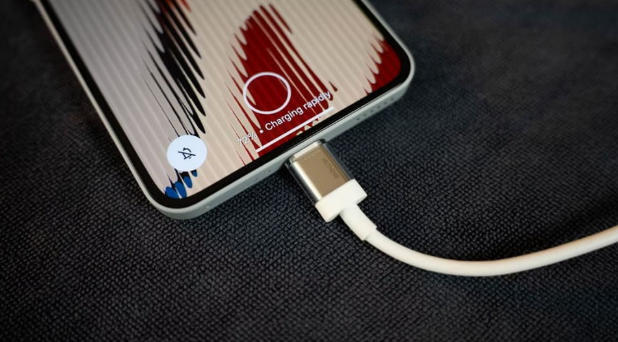

How to clean charging port: A charging port that has collected enough dirt and other small pieces of debris over the years can cause your device to charge unevenly or not at all. A charging cable may fall in and out of the port easily, and charging may not happen if the connector on the charging cable is not in the exact right position. Many people assume they need a new charger or device, and before you make these purchases you should learn how to clean your charging port because sometimes cleaning a charging port can correct these charging issues.
How to Safely Clean Your Charging Port
Before learning the techniques on how to clean your charging port, always make sure that your device is powered off and all connecting cables are removed. This prevents electrocution. The main goal of this procedure is to remove any foreign objects obstructing the port without poking any objects deep into the charging port to avoid causing any damage.
Stay Away From Metal
It may not always be clear on how to clean your charging port, but stay away from cleaning devices that consist of metal material, including paper clips, needles, pins, etc. These tools can create a dangerous situation by creating a shorting path, and in worst case, creating an electrical short that can cause further harm to the device and yourself. It may even cause damage that is beyond repair, therefore, seek professional cleaning help if you cannot clean the charging port properly.
Use of Compressed Air for Cleaning Charging Ports
There are various YouTube videos that demonstrate various methods on how to clean charging ports. Many individuals, however, recommend against the use of compressed air for cleaning charging ports. A strongly directed flow of air can blast stuff located inside a charging port even further. Moisture or fluids should not be used to clean a charging port as they can cause a short circuit. If you are going to use an air product to clean your charging port, please be sure to follow the manufacturer’s directions and do not use excessive air pressure. Lastly, you should avoid using an air product to try to clear stuck particles.
When Further Steps Are Needed
In some cases, charging issues can not be resolved by replacing the charging cable and/or Port. There can be a problem with the battery, charging port, or connected hardware. Improving the charging port issue can be fixed by a service center.
What Is A Charging Station?
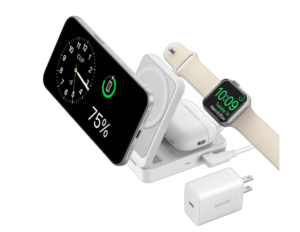
A charging station is a structure that helps the user to arrange charging cables of multiple devices in an organized manner instead of having multiple chargers scattered on surfaces. Depending upon the design, charging stations can accommodate multiple devices such as phones, tablets, earphones etc. This can be particularly helpful for people who require multiple devices to be charged at their workplace or in classrooms.
Why Should One Use A Charging Station?
The most obvious benefit is ease of use. Instead of trying to find available outlets, charging stations ensure a dedicated location for charging devices. Additionally, charging stations can help eliminate the mess of cables due to their organized design. If one is using a charging station, they won’t have to look for the devices to find out whether the device is charged or not. They can instead see the current charging status of the devices.
Choosing The Right Charging Station
Consider the devices you generally use at home and determine the charging configuration that is most appropriate. A charging configuration that supports a small number of devices is more appropriate for a small household than a large household.
A charging configuration should be selected after evaluating compatibility with the devices to be charged, charging standards, power rating, cable configuration, and available space. The goal should be to simplify charging rather than introducing a complex mess of cables.
A Charging Configuration for Multiple Devices
Charging configurations allow a central location to be designated for charging multiple devices. Charging configurations facilitate the family effort required to charge multiple family members’ devices as efficiently as possible.
Unorganized Charging Configurations
A charging configuration should have a focus beyond providing charging capacity. A charging configuration should address organizational issues associated with cables lying on the surface. A charging configuration should provide organization and charging capacity in combination.
A charging configuration should provide organization and charging capacity in combination. A charging configuration should provide organization and charging capacity in combination. Cable management is a key organizational feature of an effective charging configuration. Maintaining a charging configuration should be prioritized.
Easier Charging and Life with Clean Ports
Charging equipment that has cleaning ports and a design that is intentional in placement, organizes charging equipment and helps the user interface with the charging system. Debris can interfere with charging, so cleaning charging equipment regularly is imperative to avoid blockages when charging.
Conclusion
Always handle the process in a gentle manner and check the integrity of the port opening. In the meantime, a well-organized charging station can help you organize desk/table charging. With the right charging accessories, combined with good charging cables and regular port checks, it is possible to simplify device charging and use.
FAQs
How often should I clean a charging port?
This is not a problem of how often, but when. Dust and lint are always around us. This is why inconsistent charging or a loose-fitting charging cable should prompt you to check the port, even if you don’t carry the device in a pocket or bag. Also, check the port regularly if charging issues are noticed.
Can your stations charge multiple devices at once?
Most charging station designs support charging multiple devices. The main thing to keep in mind is to not use a low-quality charger or a charger with a damaged tip. Also, follow the recommendations of the charger manufacturer. It is best not to overload a single electrical outlet.
Do your charging stations replace wall chargers?
While charging stations may help cut down on multiple charging stations, your device may still need other charging accessories or connections.