
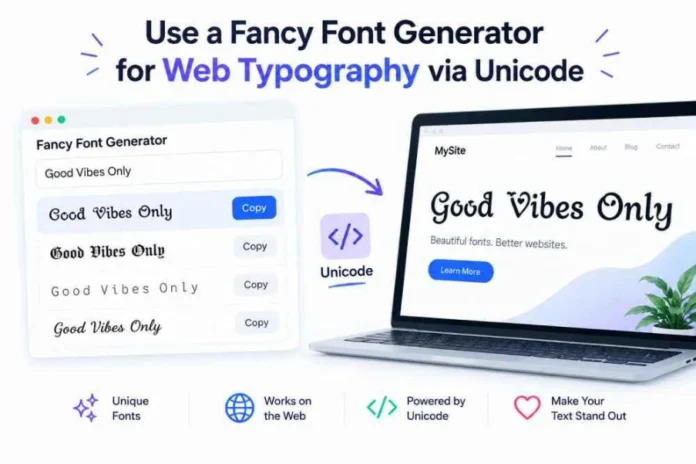

A fancy font generator works by swapping standard keyboard characters with look-alike glyphs from the international Unicode standard, allowing you to paste stylized text into platforms that do not natively allow custom font styling. When you type a standard sentence into a web tool like Fonts Generator X, the underlying software looks up the matching mathematical or stylized variant for each letter and outputs a string that retains its appearance across different devices. This mechanism means your layout translates straight into bios, chat windows, and display handles without needing a traditional font file download.
Understanding this system requires looking at how computers read text. Every time you hit a key, your operating system registers a specific code point rather than a visual design. Web browsers use these codes to display symbols from a universal master list.
Here is where it gets interesting. The glyphs you see in social media bios were never intended for casual messaging.
How Does a Fancy Font Generator Work Under the Hood?
The Role of Unicode Math Symbols in Typography
In 2001, the Unicode Consortium introduced a specific set of alphanumeric symbols designed for scientists, mathematicians, and technical writers. These blocks include bold, italic, script, gothic, and double-struck variants so equations could be written clearly in academic papers. Years later, internet users realized these math codes could double as decorative typography for everyday use.
When you use a fancy font generator X, you are using a digital lookup table. For instance, if you type the capital letter “H” into a prompt, a platform like Fonts Generator X converts that basic input into its mathematical bold twin, 𝐇, which is assigned to the specific system address U+1D407. The tool automates this conversion instantly across all 26 lowercase letters, 26 capital letters, and numbers.
But there is a catch that most people miss entirely. Computers do not read these stylized strings as vocabulary words. A screen reader or an algorithmic search engine reads 𝐇 as a lone mathematical variable, completely ignoring its contextual meaning.
Why Copying Styled Characters Isn’t the Same as Installing a Font
A standard typography file, such as a .ttf or .otf download, changes the visual skin of all text on your device locally. If you switch your personal laptop settings to a gothic theme, your essays will look stylized to you, but anyone receiving your documents will see them in their own default system setup. The data itself remains completely vanilla.
Copied Unicode characters behave differently because the style is baked directly into the data payload. No external font files are needed.
- Installed Font Files: Require local downloads, apply exclusively to your own screen, work in word processors, and remain fully searchable by automated systems.
- Unicode Text Strings: Work instantly via copy-and-paste, appear identical to every recipient, bypass application style restrictions, and can cause display issues for older tech setups.
Where Can You Paste These Custom Typographic Scripts?
Social Media Profiles and Character Count Limits
Most prominent apps allow these modified strings in display fields, but they enforce strict rules depending on security requirements. Instagram lets you use stylized glyphs inside your Name field and your 150-character bio box, but it will instantly block them if you try to modify your official @username handle. The @username field is strictly locked to basic letters, digits, periods, and underscores to prevent broken link mentions.
Here is something that catches many creators off guard: data weight. Standard Roman characters cost precisely one byte of data each. Many decorative Unicode variations require two to four bytes per letter.
This means a 15-letter handle written in double-struck characters can register as 30 characters against your bio limit. If you are struggling with tight boundaries on TikTok or X, switching to a lighter style like Small Caps can help keep your profile text within the data budget.
Gaming Nicknames and Clan Tag Layouts
Competitive multiplayer lobbies have their own separate text validation parameters. Title databases like PUBG Mobile enforce a maximum length of 14 characters for in-game IDs. If you add heavy borders or decorative brackets around your name, you consume valuable space before your actual tag even begins.
text
Standard Input: NOVA
Gaming Layout: 乂 ɴᴏᴠᴀ 乂
Use code with caution.
In the example above, the accent marks use four units of space, leaving you with very little room for long names. Free Fire accepts a wide variety of symbols but will silently drop specific codes without explaining why. It is always wise to keep a few simpler text backups ready in case your first choice fails to save.
Why Do Some Devices Show Empty Squares and Tofu Blocks?
System Updates and Glyphs Set Verification
Have you ever opened a profile and noticed a row of blank rectangles containing question marks? Designers call these missing character blocks “tofu.” They appear when a viewer’s operating system lacks the necessary font library to translate a specific Unicode address.
text
Viewer Device (Up-to-Date): ꧁ 𝓣𝓻𝓪𝓿𝓮𝓵 ꧂
Viewer Device (Out-of-Date): [X] 𝓣𝓻𝓪𝓿𝓮𝓵 [X]
Use code with caution.
Older Android phones, budget tablets, and certain smart TVs are slow to adopt recent system updates. While basic bold and italic variants enjoy near-universal support across hardware built after 2018, rare symbol additions like Egyptian hieroglyphs often fail to load. If your target audience uses older mobile hardware, sticking to classic serif or sans-serif modifications prevents your copy from turning into unreadable blocks.
Selecting Safe Alternative Symbols for Maximum Visibility
If you find that an elaborate bracket or divider is breaking on secondary screens, swap it out for a legacy element with deeper system roots. Icons like stars, standard bullets, and simple bars have been hardcoded into global operating systems since the early 1990s.
- High-Risk Elements: Complex wingdings, regional script blocks, and multi-layered stacking symbols.
- Low-Risk Alternatives: Basic geometric accents, simple mathematical dividers, and standard bold scripts.
To test your layouts quickly without changing your public profiles, copy your generated phrase and send it to yourself on a desktop chat app. If the glyphs hold up across both your mobile screen and your laptop browser, they are generally stable enough for public deployment.
How Can Creators Use Styled Text for Maximum Impact?
Highlighting the Hook in Your Feed Captions
Since social applications restrict caption previews to the first two lines before cutting off text with a “more” link, you have roughly 125 characters to capture attention. Standard text blends into the infinite feed scroll. Using a bold accent on your opening phrase breaks up the visual monotony.
Here is what works best: style the primary action phrase and leave your informational copy untouched.
text
Incorrect: 𝘚𝘵𝘰𝘱 𝘴𝘤𝘳𝘰𝘭𝘭𝘪𝘯𝘨 𝘪𝘧 𝘺𝘰𝘶 𝘸𝘢𝘯𝘵 𝘵𝘰 𝘭𝘦𝘢𝘳𝘯 𝘩𝘰𝘸 𝘵𝘰 𝘣𝘢𝘬𝘦 𝘣𝘳𝘦𝘢𝘥 𝘢𝘵 𝘩𝘰𝘮𝘦.
Correct: 𝗦𝘁𝗼𝗽 𝘀𝗰𝗿𝗼𝗹𝗹𝗶𝗻𝗴 if you want to learn how to bake bread at home.
Use code with caution.
The second approach works because it honors basic readability. Cursive and gothic styles look decorative in a profile title, but they slow down reading comprehension when deployed inside dense paragraphs. Keep your body copy clean.
Formatting Bio Links and Business Details Correctly
Never use a fancy font generator on an email address, telephone number, or URL string. Mobile operating systems rely on automated scrapers to identify phone numbers and map addresses, enabling users to call or navigate with a single tap.
Transforming a helpline into custom symbols breaks the link structure completely. A line written as 𝟎𝟑𝟎𝟎-𝟏𝟐𝟑𝟒𝟓𝟔𝟕 cannot be parsed by smartphone software, forcing your customers to manually type out the numbers. Instead, apply the styling to your header label and leave the actionable details in standard text format.
text
Order Inquiries: info@yourdomain.com
Use code with caution.
This layout keeps your visual branding intact while ensuring that your customer journey remains completely friction-free.
FAQ Section
Why do some fancy fonts look like question marks on older phones?
The reading device lacks the built-in system font file needed to display that specific Unicode code point. Older operating systems do not always recognize new mathematical or decorative character additions. Stick to standard bold or italic variations to ensure your text displays correctly on older devices.
Will using a font generator affect my website’s SEO ranking?
Yes, search engine crawlers cannot index or interpret stylized Unicode characters as standard words. If you write your primary website headers in math characters, search engines will read them as raw symbols rather than searchable keywords. Always use standard font files for critical web copy and keep stylized scripts for decorative social media fields.
Can copy-and-paste fonts transfer malware to my computer?
No, generated text characters are completely inert data strings that cannot execute code or transmit tracking scripts. They carry the same security profile as a standard emoji or punctuation mark. The only real risk is structural formatting issues on platforms with strict text verification rules.
Why does my stylized name get rejected by Facebook’s profile settings?
Facebook enforces strict name policies to prevent account impersonation and spam profiles, blocking mathematical variations in the official name field. If you want to use custom text on your page, apply the generated styles to your public posts, comments, or your intro section instead.
Conclusion
The single most useful takeaway when working with custom web typography is to use stylized text as an accent rather than a replacement for your core content. Reserve decorative Unicode characters for hooks, titles, and name fields, while keeping searchable business links and primary descriptions in standard text. This balance ensures your profiles stand out visually without sacrificing accessibility or search performance.