

High ping issues in DOTA 2 ruin the matches. Delayed skills, rubber banding, and missed last hits all come from unstable connections. This destroys the overall gaming experience. Smart Game Booster comes with a direct solution to these issues and offers gamers smoother and faster matches.
This blog provides a simple guide on why ping spikes happen and how to use Smart Game Booster to solve this issue. It also covers setup steps, pros, cons, and honest tips for best results.
Why DOTA 2 Ping Spikes Happen
- Overloaded home network with too many connected devices
- Background apps eating bandwidth during matches
- Long server distance between your PC and DOTA 2 servers. According to Valve’s official network performance guide, it has a direct impact on competitive gameplay
- Outdated network drivers slowing your connection
- Peak hour congestion on shared internet lines
Once these causes are clear, a dedicated game booster becomes a practical solution.
What is Smart Game Booster
Smart Game Booster is an all-in-one app that combines network acceleration, hardware boosting, and system cleanup. Smart Game Booster is a lightweight PC tool made by iTop Inc.
Right now, Smart Game Booster is on version 6, and it works fine on Windows 7 all the way up to Windows 11. The install is light too, just 88.0 MB, and you won’t pay a cent since it’s freeware.
What stood out to me most is the server network, over 500 spread across the globe, all built to keep latency down. On top of that, it pushes your GPU and VRAM a bit harder so gameplay feels smoother overall.
How Smart Game Booster Reduces DOTA 2 Ping
The FPS Booster feature targets both network speed and system performance together. Here is how the process works.
Step 1. Open Smart Game Booster: Click on the download option to install and launch the app.
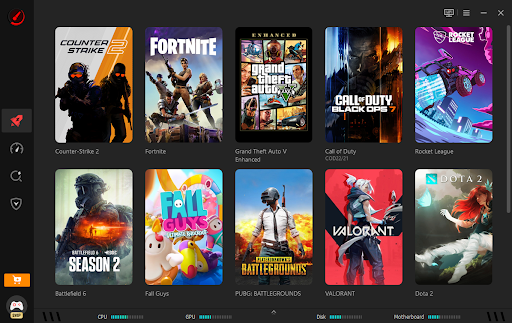
Step 2. Choose DOTA 2 to boost: Select the game from the list to boost performance and connection.
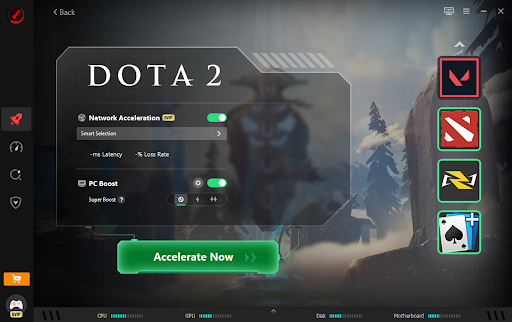
Step 3. Enjoy high FPS and low ping gaming: Players can see a 15%–35% FPS gain by releasing background RAM/CPU resources, alongside a 20–40ms ping reduction through an optimized route server connection.
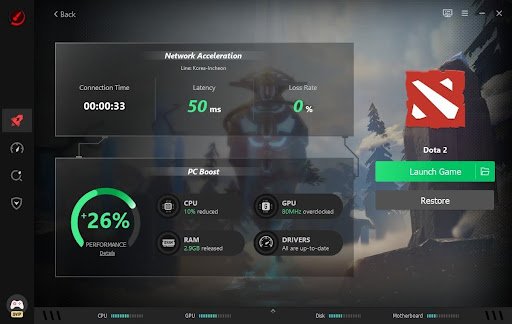
Step 4. Turn on Auto Boost: The Auto Boost settings automatically turn the gaming mode on.
Features that are Crucial to DOTA 2 Players
Network Acceleration connects players to the nearest low-latency server. It also bypasses regional blocks for smoother cross-region play.
Super Boost accelerates the GPU and VRAM. It can increase performance up to 30%. So in crowded and team-fight games, this feature helps a lot.
PC Boost disables background apps that consume CPU and RAM. Fewer background tasks mean fewer sudden frame drops.
Real Time Monitor tracks temperature and usage while playing. It alerts users before overheating affects performance.
Pros and Cons of Smart Game Booster
Balanced use means checking both strengths and limits before installing any tool.
Pros:
- Reduces ping using dedicated global game servers
- Boosts FPS through GPU and VRAM overclocking
- Simple three-step setup process
- Includes security and monitoring features
- Works across multiple Windows versions
Cons:
- Some features may need a paid upgrade
- Overclocking may not suit older hardware
- Results vary depending on internet provider speed
- Extra background tools may still need manual closing
Is Smart Game Booster Worth Trying
Gamers dealing with constant DOTA 2 lag often benefit from network-focused tools. Smart Game Booster stands out for combining ping reduction with FPS improvement.
It suits players on unstable connections or older PCs needing extra performance. Competitive players especially benefit from lower latency during ranked matches.
Results depend on your setup and internet provider quality. Testing it during a few matches gives the clearest picture.
Conclusion
Lag and high ping can affect your overall gaming experience and make you lose DOTA 2 matches. Smart Game Booster targets both issues through smart network routing and hardware tuning.
The setup takes minutes and requires no technical skill. Its features cover performance, security, and real-time monitoring in one place.
Ready for smoother DOTA 2 matches? Download Smart Game Booster today and experience lower ping with higher FPS.