
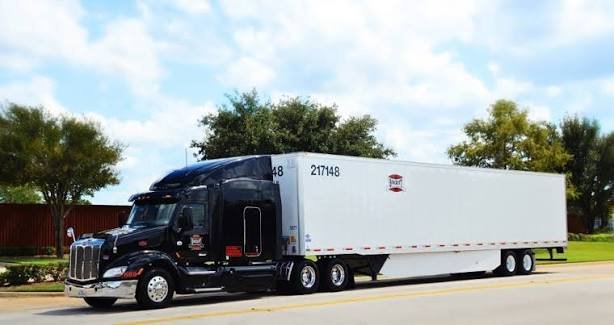
Drive I-35E or I-20 on a weekday morning, and you can watch the freight economy at work. Behind every truck there’s a dispatcher, a delivery window, a route, and more often, a layer of software. For trucking companies in Dallas, technology is no longer a nice extra. It’s how fleets keep fuel costs in check, stay compliant, and answer the question “Where’s my load?” That every customer asks.
This article looks at how DFW fleets use technology to compete, which software tends to pay off, and how to adopt it without disrupting the work your drivers already do.
Why Technology Matters for DFW Fleets
Among trucking companies in Dallas, the ones pulling ahead usually share one habit. They treat data as a working asset, not a byproduct.
Margins in trucking are thin. Fuel, insurance, maintenance, and driver pay all move up and down, and a small amount of waste on a lane can erase the profit. Customer expectations have also changed. Shippers expect live updates, accurate arrival times, and digital proof of delivery without picking up the phone.
Technology helps with both problems. It shows you where money leaks out, and it gives customers the visibility they now expect as standard. Fleets that still run on spreadsheets, paper logs, and phone calls can get by, but every day they spend more effort doing less.
The DFW Trucking Landscape
Dallas-Fort Worth is a natural trucking hub. I-35, I-20, I-30, and I-45 pass through here, and BNSF and Union Pacific intermodal terminals feed containers straight into local drayage and regional freight. Texas as a whole supports roughly 780,000 trucking-related jobs, according to the Texas Trucking Association, and a large share of that activity runs through North Texas.
The market is crowded. National carriers, regional fleets, specialized haulers, and independent owner-operators all compete for the same freight. Small and mid-sized trucking companies in Dallas often can’t win on price alone, because larger carriers have scale. What they can do is match, or beat, larger competitors on service quality, and that’s where technology comes in.
The Technologies DFW Fleets Rely On
DFW fleets increasingly rely on connected technology to manage vehicles, control operating costs, and keep deliveries on schedule. These systems help trucking companies improve visibility, reduce manual work, and make faster decisions across daily operations.
ELDs and Telematics
Electronic logging devices have been required for most commercial drivers since the federal mandate took full effect in late 2017. Compliance was the original reason to install them, but the same hardware can also report location, speed, idling time, and engine faults. Many fleets now use that data to coach drivers, reduce idle time, and spot problems earlier.
Route Planning and Dispatch Tools
DFW traffic is unpredictable. Construction zones, accidents, and rush-hour slowdowns can wreck a schedule. Modern dispatch tools account for live conditions, delivery windows, and driver hours so dispatchers aren’t guessing. Fewer missed appointments means fewer detention charges and happier customers.
Transportation Management Systems (TMS)
A TMS pulls orders, dispatch, billing, and driver settlements into one place. Without one, the same information often lives in three or four systems, and someone has to retype it. A good TMS cuts that duplication and gives owners a clearer view of profit by lane and by customer.
Dash Cameras and Safety Tools
Cameras and driver-behavior alerts are becoming standard. Used well, they’re less about catching drivers out and more about coaching, protecting good drivers in disputed claims, and lowering accident over time.
Predictive Maintenance
Engine diagnostics can flag trouble before a truck breaks down on the shoulder. Catching a failing component during a scheduled stop costs far less than a roadside repair and a missed delivery. For trucking companies in Dallas running tight schedules, that difference adds up quickly.
Customer Visibility and Integrations
Shippers increasingly want tracking links, status updates, and system-to-system connections rather than email chains. Fleets that can send shipment data directly into a customer’s system tend to win and keep larger accounts.
Autonomous Trucking Pilots
Autonomous trucks are handling commercial freight on the Dallas-to-Houston corridor, mostly with human safety observers on board. It’s early, and it isn’t replacing drivers any time soon. But it shows how seriously the industry takes automation, and it’s worth watching.
Where Off-the-Shelf Software Falls Short
Ready-made software works well for standard needs. The trouble starts when your operation isn’t standard. Maybe your dispatchers use a process no TMS supports, your ELD data doesn’t connect to your billing system, or a key customer needs a custom tracking feed. Teams then end up exporting spreadsheets, copying data by hand, and working around the software instead of with it.
That’s when custom software development starts making sense. A transportation software development company such as Unique Software Development can build tools around your real workflow, whether that means connecting telematics, dispatch, and billing, building a customer tracking portal, or creating driver apps for paperwork and updates. The goal is not more software, just software that fits how your fleet really runs.
How to Adopt New Technology Without Disrupting Operations
Rolling out new systems in a working fleet can go badly if it’s rushed. A few habits make it smoother.
- Start with a problem, not a product. Name the specific issue first, such as missed appointments, slow billing, or high idle time. Then look for the tool that fixes it.
- Involve drivers and dispatchers early. They’ll use the system daily. If it makes their day harder, they’ll find workarounds, and your data will suffer.
- Pilot before you scale. Test with a handful of trucks or one customer lane. Fix problems while the stakes are small.
- Check integrations. New tools should connect to your existing systems. Isolated software creates more manual work, not less.
- Measure results. Track simple numbers such as on-time delivery, idle time, billing speed, and maintenance costs, so you know whether the change is paying off.
- Plan for growth. Choose tools that can handle more trucks, more customers, and new lanes without a full rebuild.
Most trucking companies in Dallas struggle with technology rollout failures when they implement too many tools at once, or don’t provide sufficient training to employees.
What’s Next for DFW Fleets
Predictive tools will get better at forecasting maintenance and delays. Driver-facing apps will continue replacing paperwork, and many fleets now hire a mobile app development company in Dallas to build apps their drivers actually use. And automation, while gradual, will keep creeping into specific lanes and tasks.
None of this requires a fleet to chase every new trend. It does require staying curious and testing new ideas in small, low-risk ways.
Final Thoughts
Technology won’t replace good drivers, solid dispatchers, or strong customer relationships. What it does is give those people better information and fewer repetitive tasks. Fleets that use data well can price more accurately, deliver more reliably, and respond faster when something goes wrong.
You don’t need to modernize everything overnight. Pick one pain point, find a tool or invest in a custom solution that addresses it, measure the result, and build from there. Over time, those small steps are what separate the strongest trucking companies in Dallas.
Ready to make your fleet more efficient? Connect with a custom software company that offers trucking software development services built around your dispatch, tracking, and billing needs.